GitHub Copilot

GitHub Agentic Workflows – Working Implementation Part1

As part of my ongoing exploration of modern DevOps and AI‑assisted engineering practices, I recently built a Proof of Concept (POC) using the newly launched GitHub Agentic Workflows. The goal was simple but impactful: automate the generation of a daily status report by letting agents reason over repository activity and produce a meaningful summary.
 
In this blog, I’ll walk through why I chose this use case, how the agentic workflow is designed, and what I learned from the POC.

Why Daily Status Reports?

Daily status reporting is one of those activities that is essential but often repetitive:

  • Engineers manually summarize commits, PRs, and issues
  • Leads consolidate updates across repos and teams
  • Context often gets lost, and reports vary in quality

This made it a perfect candidate to test agentic workflows, where agents can:

  • Observe repository signals
  • Reason over changes
  • Generate structured, human‑readable output

What Are GitHub Agentic Workflows (In Simple Terms)?

Traditional GitHub Actions follow a deterministic, step-by-step execution model. Agentic workflows, on the other hand, introduce a more intent-driven approach:

  • You define what outcome you want
  • Agents decide how to reach that outcome
  • Agents can iterate, reason, and refine results

POC Architecture Overview

At a high level, the workflow looks like this:

  1. Trigger

    • Scheduled (daily) or manual trigger
  2. Context Collection Agent

    • Gathers commits, PRs, issues, and workflow runs
    • Focuses only on activity within the last 24 hours
  3. Reasoning Agent

    • Groups related changes
    • Filters out noise (minor version bumps, formatting-only commits, etc.)
    • Identifies themes (features, bug fixes, infra changes)
  4. Report Generation Agent

    • Produces a clean, structured daily status report
    • Outputs in Markdown for easy sharing

Designing the Agent Logic

One of the most interesting parts of this POC was thinking in terms of agent behavior, not steps.

Instead of:

  • “Fetch commits”
  • “Loop through commits”
  • “Format text”

I defined instructions like:

  • Summarize meaningful engineering progress
  • Highlight risks or blockers if detected
  • Keep the tone concise and leadership-friendly

This shift in mindset is where agentic workflows really shine.

Here are the steps 

  1. Create one repo in GitHub, here I have created simple terraform code (Not a Production Grade though )
  2. Install the GitHub Agentic Workflows extension. here is the code gh extension install github/gh-aw
  3. Add daily status report workflow in your repo gh aw add-wizard githubnext/agentics/daily-repo-status 
  4. Select appropriate AI Engine as per your choice, in this demo we will choose first option i.e. GitHub Copilot CLI with agent support option
  5.  Now we need to create PAT token and paste in above CLI terminal
  6. Just generate new New fine-grained Personal Access Token and give Read only access to  Copilot Requests, generate PAT token and copy in above step
  7. This will create a new PR, just merge it from CLI
  8. The daily-repo-status.md file contains markdown description what Workflow Agent should do. 
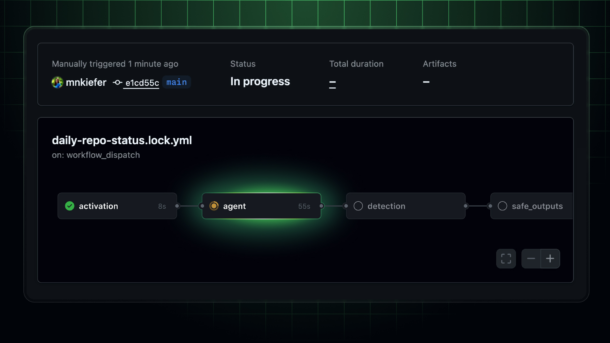
  9. The daily-repo-status.lock.yml file contains actual Agentic Workflow Action

Sample Output: Daily Status Report

Here’s an example of the kind of report the workflow generates. Basically this GitHub Agent workflow will generate daily status report of your GitHub Repository and create a new issue:

Daily Engineering Status – 19 Feb, 2026 – https://github.com/ranglanimanish90/newinfra/issues/5

  • Project 

    • Basically report is giving generic overview of the project repository
    • What type of code it contains. E.g. in this case it is using IaC
    • Recent Activities in last 24 hours
  • Pull Request, Releases, Issues

    • How many Open PRs, closed PRs
    • New Releases v1.0 “Release v1”
    • Open Issues, closed Issues
  • Recommendation for next step

    • Terraform module updates for logging standardization
    • Testing and Validation scope
  • Critical security Alerts 

    • Check this our another daily status report https://github.com/ranglanimanish90/newinfra/issues/13
    • Here it found out that there is one hardcoded AWS Secret added in code and asking to remove it immediately. (Please note given AWS Key is dummy and added just to validate effectiveness of Agent to capture security loop holes)

The output is consistent, readable, and context-aware, without manual effort

What Worked Well

Reduced Manual Effort
The report is generated automatically, saving time for both engineers and leads.

Consistency
Same structure, tone, and level of detail every day.

Context-Aware Summaries
The agent doesn’t just list commits—it explains what changed and why it matters.

Challenges & Learnings

⚠️ Prompt Quality Matters
The clarity of GitHub Agentic Workflow agent instructions directly affects output quality. Small wording changes can significantly improve summaries.

⚠️ Noise Control
Without guidance, agents may over-report trivial changes. Explicitly defining “what is meaningful” helps a lot.

⚠️ Trust but Verify
Agentic output is powerful, but for leadership-facing reports, a quick human review still adds confidence.

Where This Can Go Next

This POC opens up several interesting possibilities:

  • Weekly or sprint-level summaries
  • Release notes auto-generation
  • Engineering health dashboards
  • Integration with internal DevOps portals or CoEs

Personally, I see strong potential for using agentic workflows as DevOps accelerators, especially in large, multi-repo environments.

Important Notes..

  • Avoid updating daily-repo-status.lock.yml file directly otherwise your GitHub Action workflow will fail.
  • If you need your Agent to work in specific way just write down details in daily-repo-status.md file and compile your code using command –> gh aw compile